You are one network drop away from a frozen UI. If your Flutter application relies on a flawless HTTP connection to resolve its navigation state, you are shipping a liability, not a robust product. An Offline-First Flutter Architecture shifts your engineering mindset from guessing state over the cloud to knowing it deterministically on the device.
When you build for extreme resilience, your application stops reacting to connectivity issues and simply ignores them.
The Blackout Scenario: Why Aesthetics Fail in Production
In safety-critical environments like automotive cockpits, medical devices, and industrial control panels, a beautiful user interface means absolutely nothing if it locks up during a blackout. Network requests drop. Cloud APIs timeout. When a driver enters a tunnel, the navigation map must keep moving. When an engineer pulls up an offline machine schematic, the screen must render instantly.
Standard REST-based state management patterns fail catastrophically in these conditions. They assume the presence of a server. When that server disappears, the app enters an undefined state, usually resulting in endless loading spinners or hard crashes.
Building the infrastructure to handle these edge cases requires specialized knowledge. Implementing local-first syncing, conflict-free replicated data types (CRDTs), and offline routing engines consumes thousands of engineering hours. These are massive time-sinks for any development team trying to hit a deadline.
This infrastructure burden is exactly why enterprise agencies rely on production-ready Flutter templates and SaaS-in-a-Box bundles from Stacklyn Labs. Bypassing these foundational architectural headaches lets you ship robust, offline-capable products months faster. You buy the plumbing so you can focus on building the house.
Defensive Engineering: Deep-Links and State Restoration
Consider the exact behavior of an application when a user clicks a deep-link to a specific map coordinate while their device is offline. Without a locally cached topology, a standard Flutter app defaults to a blank screen or a generic error widget. The navigation stack crashes because it cannot resolve the payload required to build the target screen.
Worse, consider background process death. Mobile operating systems (both iOS and Android) aggressively kill suspended applications to reclaim memory. If your app relies entirely on volatile RAM to track its routing history, the user loses their entire session the moment they switch back from another app.
Surviving Process Death with RestorationMixin
We enforce a strict, defensive implementation pattern. By leveraging the RestorationMixin in Flutter, you can serialize the navigation stack directly to disk in real-time. This guarantees that even after a full OS-level process death, the application re-launches exactly where the user left off.
You achieve this continuous user experience without requiring a single network packet to “remember” the previous destination.
Dart
// Flutter: Resilient Navigation State Restoration
class NavObserver extends NavigatorObserver with RestorationMixin {
  final RestorableString currentRoute = RestorableString('/');

  @override
  String get restorationId => 'nav_history';

  @override
  void restoreState(RestorationBucket? oldBucket, bool initialRestore) {
    registerForRestoration(currentRoute, 'current_route');
  }

  @override
  void didPush(Route route, Route? previousRoute) {
    currentRoute.value = route.settings.name ?? '/';
    super.didPush(route, previousRoute);
  }
}
This NavObserver intercepts push and pop events at the framework level. By overriding didPush, we write the current route name into a RestorableString. The operating system manages this storage bucket natively, ensuring the data persists across violent app terminations.
Performance Deep Dive: Bypassing the JSON Trap
Saving state locally sounds simple until you measure your frame pacing. Serializing complex navigation objects to JSON during every screen transition introduces severe CPU load. In Flutter, JSON parsing and stringification happen on the main isolate by default.
When you block the main UI thread with heavy serialization tasks, you drop frames. This causes visible UI stutter (jank) during animations, destroying the perceived performance of your application. Relying on standard SharedPreferences for complex state compounds this issue, as it often forces synchronous reads.
Binary Persistence for 60fps Continuity
For high-performance environments like embedded Linux Flutter deployments, we abandon stringification entirely. Instead, we architect the state layer around binary serialization formats.
Tools like Hive write data directly as highly optimized binary blocks, bypassing the slow JSON parsing pipeline entirely. This architectural choice reduces local storage write latency to sub-5ms. Keeping background operations well under the strict 16ms frame budget is non-negotiable for maintaining flawless 60fps UI continuity during fast screen transitions.
Memory Management and Lazy-Loading
Retaining every visited route in memory is a fast track to Out-Of-Memory (OOM) crashes. Large route observers and deeply nested navigation stacks leak memory aggressively if you fail to dispose of their controllers.
We implement strict lazy-loading strategies. Secondary navigation modules such as deeply nested settings menus or historical log views stay completely out of RAM until explicitly requested by the user. Once the user pops that specific branch off the widget tree, the framework unmounts the module and triggers garbage collection. This keeps the core navigation isolate exceptionally lean.
Architecting a Deterministic Route Registry
“Ghost routes” occur when an offline deep-link points to a screen that requires an active server connection to render. To eradicate ghost routes, we replace dynamic, on-the-fly routing with a highly structured, deterministic Route Registry.
This registry, often built on top of Flutter’s declarative Router API (Navigator 2.0), enforces rigid rules on how the application processes movement:
- Versioned Route Manifest We map every unique route ID to a specific, offline-capable widget. If a deprecated deep-link requests a widget that no longer exists, the manifest intercepts the call. It immediately redirects the user to a safe, pre-cached fallback screen, preventing a null-pointer crash.
- Cached Offline Topology Core map vectors, HMI layouts, and initial application states live inside a local Hive database. The UI layer reads exclusively from this local data store. Network calls exist strictly to refresh this database silently in the background. The network never dictates what the user sees directly.
- Resilient Error Boundaries We wrap every major navigation node in a custom
ErrorWidget. If a specific page throws a rendering exception due to corrupted local data, the boundary catches the exception at the widget level. The system instantly “hot-swaps” the broken UI for a functional 2D fallback component, ensuring the user is never trapped on a broken screen. - Navigation Lock and Debouncing Frustrated users tap buttons repeatedly when hardware lags. We implement a strict navigation lock that debounces routing calls on the UI thread. This completely prevents “double-pushing” identical routes onto the stack and protects the local database from redundant read/write cycles.
Validating Transitions with Visual Regression Testing
Manual testing of a complex offline navigation architecture is an inherently flawed process. Human testers consistently miss pixel-level shifts across hundreds of state changes and route transitions. Relying on manual QA to verify every edge case is a massive waste of engineering resources.
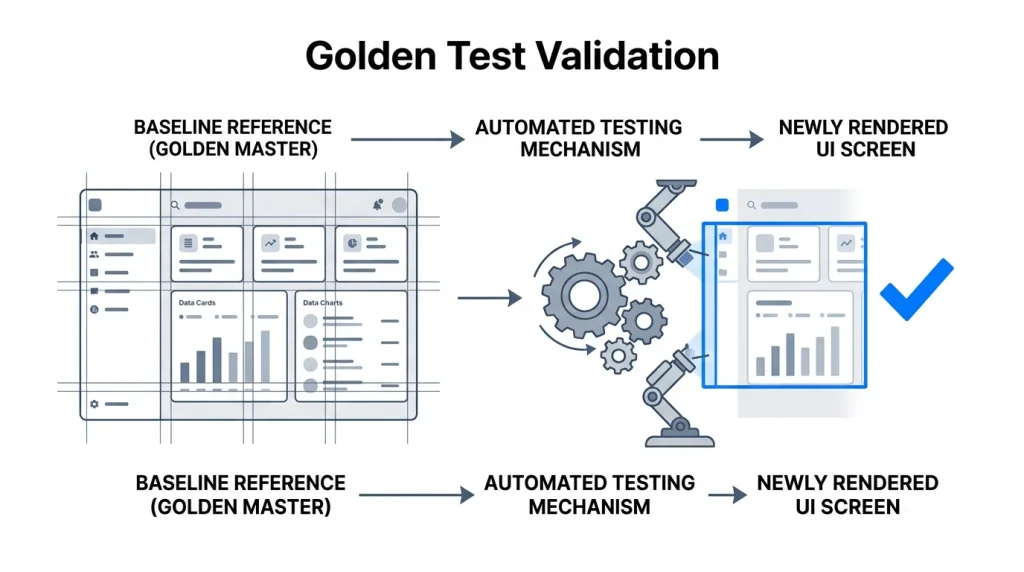
We enforce Golden Tests as a mandatory checkpoint in our build pipelines. Golden Tests capture pixel-perfect screenshots of every screen transition in a heavily controlled, isolated test environment.
Dart
// Flutter: Golden Test for Route Transition
testWidgets('Settings route should render correctly', (tester) async {
  await tester.pumpWidget(const MyApp());
  await tester.tap(find.byIcon(Icons.settings));

  // Wait for the route push animation to fully complete
  await tester.pumpAndSettle();

  // Compare against the mathematical baseline
  await expectLater(
    find.byType(SettingsPage),
    matchesGoldenFile('goldens/settings_page.png')
  );
});
CI/CD Integration for Unbreakable Builds
By invoking pumpAndSettle(), the test environment waits for all route animations to finish executing. It then compares the final rendered SettingsPage against a pre-approved baseline image (the golden file).
We run these tests in headless CI/CD environments (like GitHub Actions) using strictly defined font families (like the Ahem font) to eliminate rendering discrepancies between Linux test servers and Mac development machines. If a developer accidentally breaks a layout constraint that alters the visual fidelity of an unrelated route, the pipeline fails the build instantly. This guarantees your UI remains mathematically perfect.
Stop Building Infrastructure. Start Shipping.
Resilience is a strict engineering discipline, not a third-party library you install via pubspec. You must aggressively manage memory boundaries, dictate deterministic state rules, and engineer your application for total network failure from day one.
Writing this level of robust routing, local-sync logic, and state restoration from scratch drains months of development time. It pulls your focus away from the features your users actually care about.
Smart engineering teams utilize the offline-first architectures bundled by Stacklyn Labs. You drop a hardened, rigorously tested foundation directly into your repository and start building product features on day one. Stop reinventing the wheel. Treat resilience as a baseline standard, and get your software to market.
References & Further Reading
- Architecture: Hive: Lightning Fast NoSQL for Flutter
- Platform: Flutter on Embedded Linux
- Stacklyn: Request a Custom HMI Resilience Audit directly from the Stacklyn Labs engineering team.
Stacklyn Labs
Developer Notes & Updates