You just recorded a flawless 30-minute remote client interview. The user hits "upload," the progress spinner creeps up to 99%, and then the network drops.
The connection terminates, the local cache clears, and the data is gone forever. This scenario is a massive liability for modern software applications. The traditional REST-based upload model where you record media locally, buffer a massive blob in memory, and POST it to a server is a ticking time bomb of data loss. Relying on continuous, unbroken HTTP connections for large file transfers on consumer network setups guarantees failure at scale.
To build enterprise-grade media applications, you have to move away from batch uploads. You need a system where the server captures the media the exact millisecond it is generated. At Stacklyn Labs, we orchestrate these pipelines using WebRTC and Azure Communication Services (ACS).
Here is exactly how we architect zero-loss media streams, handle notorious networking edge cases, and build post-processing pipelines that scale.
The WebRTC Paradigm: Streaming Over Storing
REST APIs are stateless by design. They do not care about the health of the connection until the entire payload is delivered. WebRTC flips this model entirely.
Instead of waiting for an MP4 to finalize on a client's device, WebRTC establishes a persistent, stateful peer-to-peer (P2P) connection. It transmits data using RTP (Real-time Transport Protocol) packets. If a user's internet cuts out for five seconds, you lose five seconds of video, but the preceding 25 minutes are safely written to your cloud storage. You completely eliminate the catastrophic "99% failure" scenario.
However, building reliable WebRTC infrastructure from scratch is a massive time-sink for development teams. Orchestrating state management, handling connection drops, and managing real-time packet loss can consume months of engineering runway. This is exactly why agencies utilize our production-ready SaaS-in-a-Box bundles. By leveraging pre-built, offline-first mobile architectures and tested media pipelines, teams bypass these low-level infrastructure headaches and ship features immediately.
Handling the Edge Cases: NAT Traversal and Signaling
WebRTC is notoriously hostile to restrictive corporate networks. You cannot simply request a P2P connection and expect it to work in a production environment.
Defeating Symmetric NATs
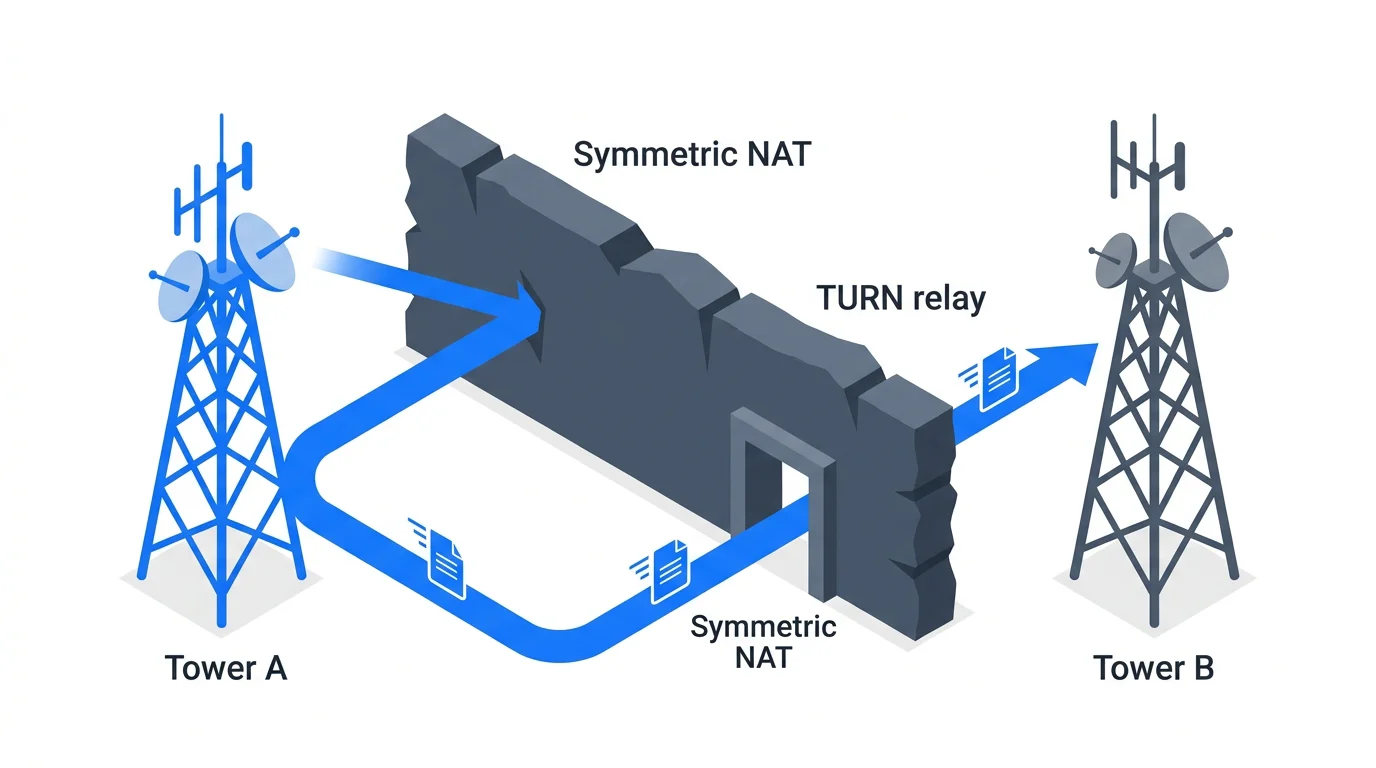
Between Symmetric NATs (Network Address Translation) and deep-packet inspection firewalls, direct peer connections fail constantly. A standard STUN (Session Traversal Utilities for NAT) server will tell you your public IP, but it cannot punch a hole through a strict corporate firewall.
Without a robust TURN (Traversal Using Relays around NAT) server fallback, your "reliable" stream will never start. TURN servers act as high-bandwidth middlemen, relaying the actual media packets when a direct connection is impossible. It is an expensive fallback, but it is an absolute requirement for production media apps.
Building Defensive Signaling
Signaling is the process where two devices agree on how to communicate before the video starts. They exchange SDP (Session Description Protocol) data. Signaling timeouts where this SDP exchange hangs indefinitely account for up to 40% of WebRTC initialization failures.
Implementing a defensive signaling state machine is mandatory. You must monitor the connection states actively and force fallbacks when candidates fail.
JavaScript
// JavaScript: Defensive ICE Connection Monitoring
peerConnection.oniceconnectionstatechange = () => {
    switch (peerConnection.iceConnectionState) {
        case "failed":
            console.error("NAT Traversal Failed. Restarting ICE with TURN only...");
            // Force fallback to relay to bypass strict firewalls
            peerConnection.restartIce();
            break;
        case "disconnected":
            // Implement UI jitter-buffer alerts to warn the user
            handleTemporaryConnectionLoss();
            break;
    }
};
Performance Deep Dive: Jitter Buffers and Main Thread Throttling
Unlike a REST upload where network latency only delays the final success message, WebRTC latency degrades the actual recording. If packet jitter is too high, the server-side recording will experience heavy artifacting or desync issues between the audio and video tracks.
You must control the client-side environment to ensure stable packet delivery. The biggest hidden enemy of WebRTC capture in web environments is browser resource optimization.
The Background Tab Problem
Modern browsers aggressively throttle background tabs to save battery life. If your user switches tabs to look at their notes during a recording, the browser scales back CPU allocation. The requestAnimationFrame loop slows down. The immediate result is a massive drop in captured frames.
To mitigate this, you must offload orchestration. We use a Web Worker to handle the media pipeline. By isolating the streaming logic in a background worker, you ensure that the main thread's layout shifts, garbage collection spikes, and tab-throttling policies do not throttle your capture bitrate.
Architecture: The Event-Driven Post-Processing Pipeline
The polish of a modern media architecture lies in the asynchronous hand-off. When the recording ends, you cannot block the client-side API waiting for cloud servers to transcode an MP4.
At Stacklyn Labs, we rely heavily on event-driven architecture to detach the user experience from heavy backend processing. We use Azure Event Grid to listen for file system changes and trigger downstream workflows without holding the client hostage.
Here is the four-step pipeline we implement for enterprise clients:
- Media Capture: ACS streams RTP packets directly to a managed recording bot in the cloud. The media is persisted in real-time to a secure, temporary Azure Blob container.
- Event Trigger: The exact moment the ACS recording bot finalizes the MP4 container, Azure Event Grid fires a
RecordingFileStatusUpdatedwebhook. - Transcription Worker: This webhook triggers a serverless function. The function picks up the finalized MP4 and pushes the audio track into an AI service like Whisper AI or Azure Speech-to-Text to generate an instant, highly accurate transcript.
- Permanent Storage: Once processing is complete, the application moves the raw files and metadata to permanent S3 or Blob storage. Lifecycle policies automatically enforce 10-year compliance retention.
Production Strategy: Testing and Deployment
Building the architecture is only half the battle. You have to keep it alive during traffic spikes and deploy code with confidence.
Simulating Network Hostility in CI/CD
Automated unit testing for WebRTC is practically impossible if you do not mock the RTCPeerConnection and MediaStream objects. Real network interfaces are too flaky for reliable CI/CD pipelines.
We implement Fake-WebRTC libraries in our test suites. These tools allow us to programmatically simulate 300ms network jitter, 5% packet loss, and aggressive ICE connection drops during our continuous integration cycles. This guarantees our UI remains resilient and our state machines fire correctly under poor network conditions.
Scaling the Signaling Server
When you deploy to production, your signaling server (whether it is a custom WebSocket implementation or Socket.io) must be configured correctly at the load balancer level. WebSockets are stateful. If a user connects to Server A to send an SDP offer, their subsequent SDP answer cannot be routed to Server B.
Deploy your signaling nodes behind an Nginx proxy with Sticky Sessions enabled. This ensures that the entire handshake remains pinned to the exact same server instance, eliminating random "Session Not Found" errors during auto-scaling events.
Nginx
# Nginx Sticky Session Config for WebRTC Signaling
upstream signaling_nodes {
    ip_hash; # Enforces sticky sessions based on client IP
    server 10.0.0.1:8080;
    server 10.0.0.2:8080;
}
Moving Forward
Reliability in media streaming is earned through defensive architecture rather than powerful APIs alone. Dropping REST and batch uploads in favor of an event-driven WebRTC pipeline requires an upfront investment in infrastructure, but the payoff is absolute stability.
Stop letting arbitrary HTTP timeouts dictate your user experience. Handle the edge cases, offload heavy processing to background workers, and build an infrastructure that treats data retention as a real-time guarantee.
If you would rather start an app from a finished codebase, see our Flutter app templates.
References & Further Reading
- Infrastructure: Azure Communication Services Guide
- Standards: Setting up STUN/TURN for Production
- Stacklyn: Request a Custom Media Streaming Architecture Audit

Written by Stacklyn Labs
Stacklyn Labs is a small studio publishing offline-first Flutter templates on CodeCanyon and Codester since 2025, and building custom Flutter and web apps for the teams who buy them.