SERVICEGoogle Play + App Store

App Store Submission Service for Flutter Apps

Your Flutter app is built and signed. Now Play Console wants a Data safety form, a content rating and possibly a 14-day closed test, and App Store Connect wants privacy labels, an age rating, screenshots at exact pixel sizes and an export compliance answer, all before anyone reviews the app. We upload your build to one or both stores on developer accounts in your name, set up the listing and every form, and submit it. One store from $75, both from $120.

Is this for you?

It is if you have a finished, signed build: an Android App Bundle for Google Play, an iOS build for App Store Connect, or both. Maybe it came out of our Pro reskin, maybe you or a freelancer built it. You opened the consoles and stalled on the forms, the screenshot sizes, or a closed-test rule nobody mentioned when you bought the template.

It isn't for you if the app isn't built and signed yet. That comes first. Our Flutter app reskinning service ends with store-ready builds, and you can add submission on top. It also isn't for you if you want the app published under our developer account. We don't do that for anyone, and the FAQ below explains why it would hurt you.

If your app has already been rejected, skip to the Rejection Rescue tier. We quote it after we read the rejection message.

What's included

Everything below happens on accounts you own. We work as an invited team member and you remove us when we're done.

Accounts and access

  • Developer accounts in your name. Google Play charges a US$25 one-time registration fee. Apple charges 99 USD per membership year, and local prices vary. You pay both directly. If you register as an organization, both stores ask for a D-U-N-S number, so start that early.
  • Access by invitation, not passwords. In Play Console, the account owner invites us under Users and permissions, limited to your app, with an expiry date if you like. In App Store Connect, you invite us under Users and Access with a role we name for you.
  • Identity and device verification stay with you. Google requires personal accounts to complete verification before publishing, and only the account holder can do that.

Store listing

  • Listing text written and entered. On Google Play: app name (30 characters), short description (80) and full description (4,000). On the App Store: name and subtitle (30 characters each), description (4,000) and keywords (100 bytes). We write from what the app actually does, and you approve every word before it goes in.
  • Category chosen on both stores.
  • Screenshots and feature graphic sized from your screenshots or ours. For Google Play, a 1024 x 500 feature graphic and at least two screenshots, up to eight per device type, within Google's size and aspect rules. For the App Store, the required iPhone set (1179 x 2556 or 1206 x 2622 portrait), plus the 13-inch iPad set if your app runs on iPad. No transparency on either store.
  • Privacy policy URL check. Both stores require one, even if your app collects nothing. Google also wants a link or the text inside the app, and Apple's guideline 5.1.1(i) asks for an in-app link too. We check that your URL loads and that the app links to it. The policy itself is yours.
  • Support URL for the App Store, which Apple requires to lead to real contact details.

Forms and declarations

  • Google Play Data safety form. Required for every published app, including apps that collect nothing. It covers data your third-party SDKs send as well as your own code.
  • Google Play content rating questionnaire (IARC). Google removes apps without a rating.
  • Google Play App content declarations: ads, target audience and content, and sign-in details for the reviewer.
  • Apple App Privacy labels. Required for new apps and updates, and they include what ad networks, analytics and other SDKs in your app collect.
  • Apple age rating questionnaire. An unrated app can't be published on the App Store.
  • Export compliance answer for Apple's encryption questions, so the build isn't held at Missing Compliance.
  • Review notes and demo account. Apple's guideline 2.1 asks for demo account details if the app has a login. Play Console has its own sign-in details section. We also note anything a reviewer could get stuck on, such as a PIN lock.

We fill in the privacy and compliance forms from what your build does and what you tell us it sends off the device. You confirm them before submission. Both stores put the responsibility for those answers on the developer, and that's you.

Google Play app publishing: testing and submission

  • Closed test set up, if your account needs one. Personal Play accounts created after 13 November 2023 must run a closed test with at least 12 testers opted in continuously for at least 14 days before applying for production access. We create the test track, upload the build, give you the opt-in link and explain the rules. Finding the 12 testers is up to you.
  • Production access application and production release once the 14 days are complete. Google says it usually reviews the application within seven days, sometimes longer.
  • Submission for review on organization accounts and older personal accounts, which can go to production without the closed test.
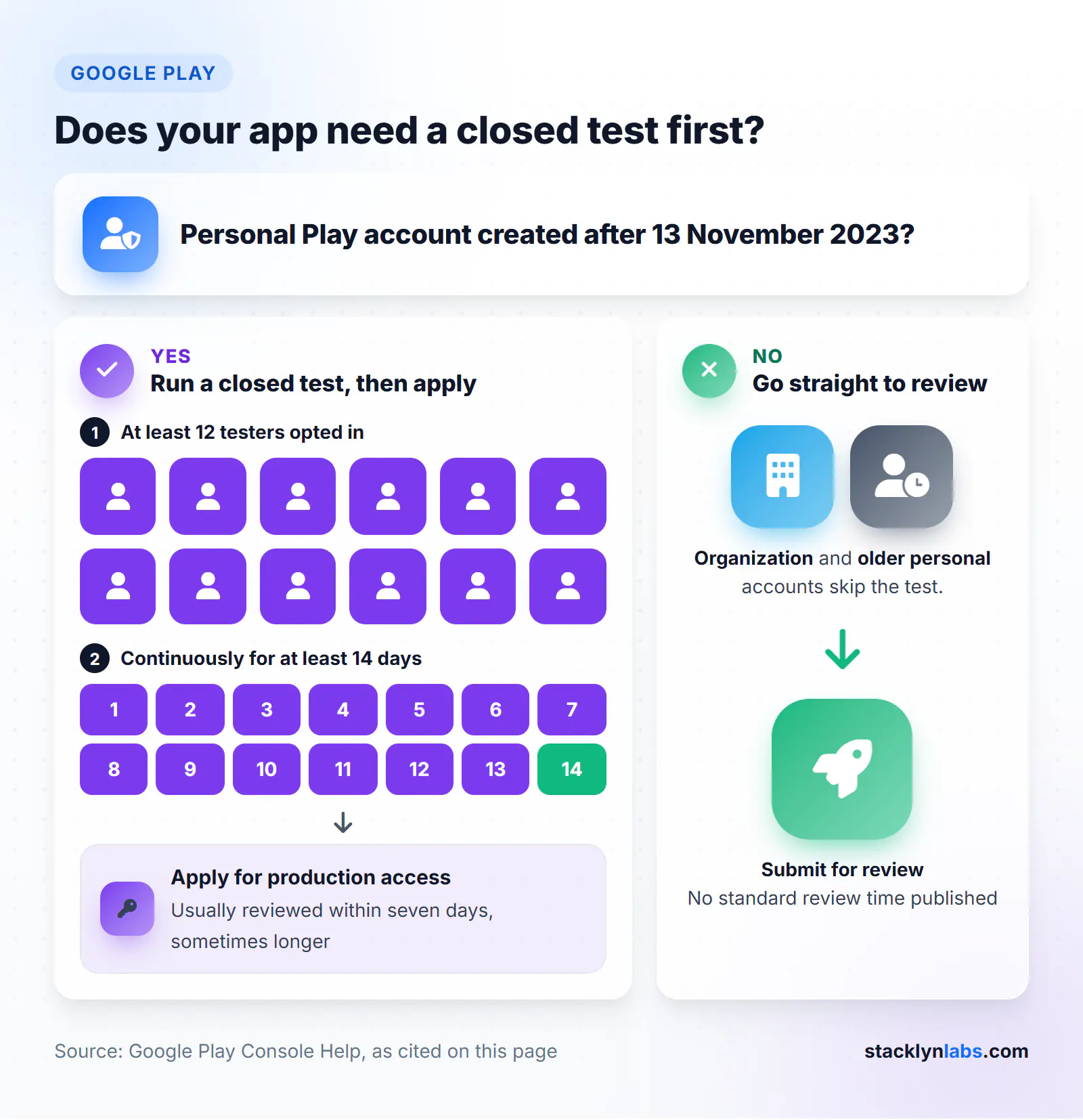
Google Play decision guide: 12 testers for 14 days before production access, or straight to review
Only personal Play accounts created after 13 November 2023 need the closed test before production access.

App Store submission

  • Build attached and submitted. If your build is already in App Store Connect, we start from there. If not, we upload the signed build you give us.
  • Submission for review with your notes, privacy labels and rating in place.

One round of review feedback

If a store sends the submission back, we handle one round per store: read the message, fix what sits in the listing, forms, notes or account settings, reply to the reviewer where the console allows it, and resubmit. If the fix needs a code change, we tell you what and quote it before doing anything.

Checks before we upload

We check your build against the current store rules before it goes anywhere. Google Play now requires new apps and updates to target Android 16 (API level 36); the extension window ended on 1 November 2026. Apple requires uploads built with Xcode 26 or later on the iOS 26 SDK, with a minimum of iOS 13. If the build misses one of these, it needs rebuilding before we can submit, and that's not part of this service.
Fixed Pricing

What It Costs

Two published prices and one quote. The “+” is there because some apps need more listing work than others (more languages, more device types). You get a fixed price before any work starts, and it doesn't move after that.

One Store
$75+

per app, Google Play or App Store

Your signed build uploaded to one store on your account, with the listing, forms and submission done.

  • Upload of Your Signed Build
  • Listing Text, Category & Graphics Sizing
  • Privacy, Rating & Compliance Forms
  • Review Notes & Submission
  • 1 Round of Review Feedback
  • Listing Ready in 2–3 Business Days
Submit to One Store
Most Popular
Both Stores
$120+

per app, Google Play + App Store

The same work on Google Play and the App Store, including the Play closed test where your account needs one.

  • Everything in One Store, on Both
  • Play Data Safety & Apple Privacy Labels
  • Play Closed Test Set Up & Explained
  • Production Access Application
  • 1 Round of Review Feedback per Store
  • Listing Ready in 2–3 Business Days
Submit to Both Stores
Rejection Rescue
Quote

fixed, after we read the rejection

For an app a store has already rejected. Send us the exact message from App Review or Play Console.

  • Rejection Message & Guideline Reviewed
  • Fixed Quote Before Any Work
  • Listing, Form & Notes Fixes
  • Reply to Reviewer & Resubmission
  • Code Changes Quoted Separately
Send Your Rejection

Buying a Pro reskin as well? Add either store option to it: the reskin is from $150, one store is $75+, both are $120+. All work is under NDA by default. We accept PayPal, Wise and direct bank transfer.

Turnaround

We prepare the listing and forms within 2–3 business days of having your build, your assets and access to your developer accounts. Most delays come from waiting on account access or a new account's verification, not from the listing work, so open your developer accounts first.

After submission, the stores set the pace and we can't speed them up:

  • Apple says it typically reviews at least 50% of submissions in under 24 hours and 90% in under 48 hours. An incomplete submission takes longer or fails.
  • Google Play, new personal accounts: the closed test runs at least 14 days from the point 12 testers are opted in, and Google says the production access review that follows usually takes seven days or less. Start recruiting testers the day you order.
  • Google Play, other accounts: Google doesn't publish a standard review time that we could confirm, so we won't guess one.

What we need from you

  1. Your signed build. An .aab for Google Play, a signed iOS build for the App Store, or a note that the iOS build is already in App Store Connect.
  2. Developer accounts in your name, already registered and verified: Google Play Console, Apple Developer Program, or both.
  3. An invitation to each account, limited to the app where the console allows it.
  4. Screenshots of the app in use with your own content, not the template's demo data. If you don't have any, tell us and we'll take them from the build.
  5. Your logo at high resolution, for the feature graphic and listing icon.
  6. A privacy policy URL and a support URL on pages you control.
  7. A list of what the app sends off the device: ads, analytics, Firebase, your own server. If you don't know, tell us what's in the app and we'll work it out from the build.
  8. A demo login or PIN if any part of the app is locked.
  9. Your answers on content and audience: who the app is for and anything in it that affects the age rating.
  10. For the closed test, a list of tester email addresses, or a Google Group, as you recruit them.

Missing some of this? Send the brief anyway and we'll tell you what to set up first.

How our app store submission service for Flutter apps works

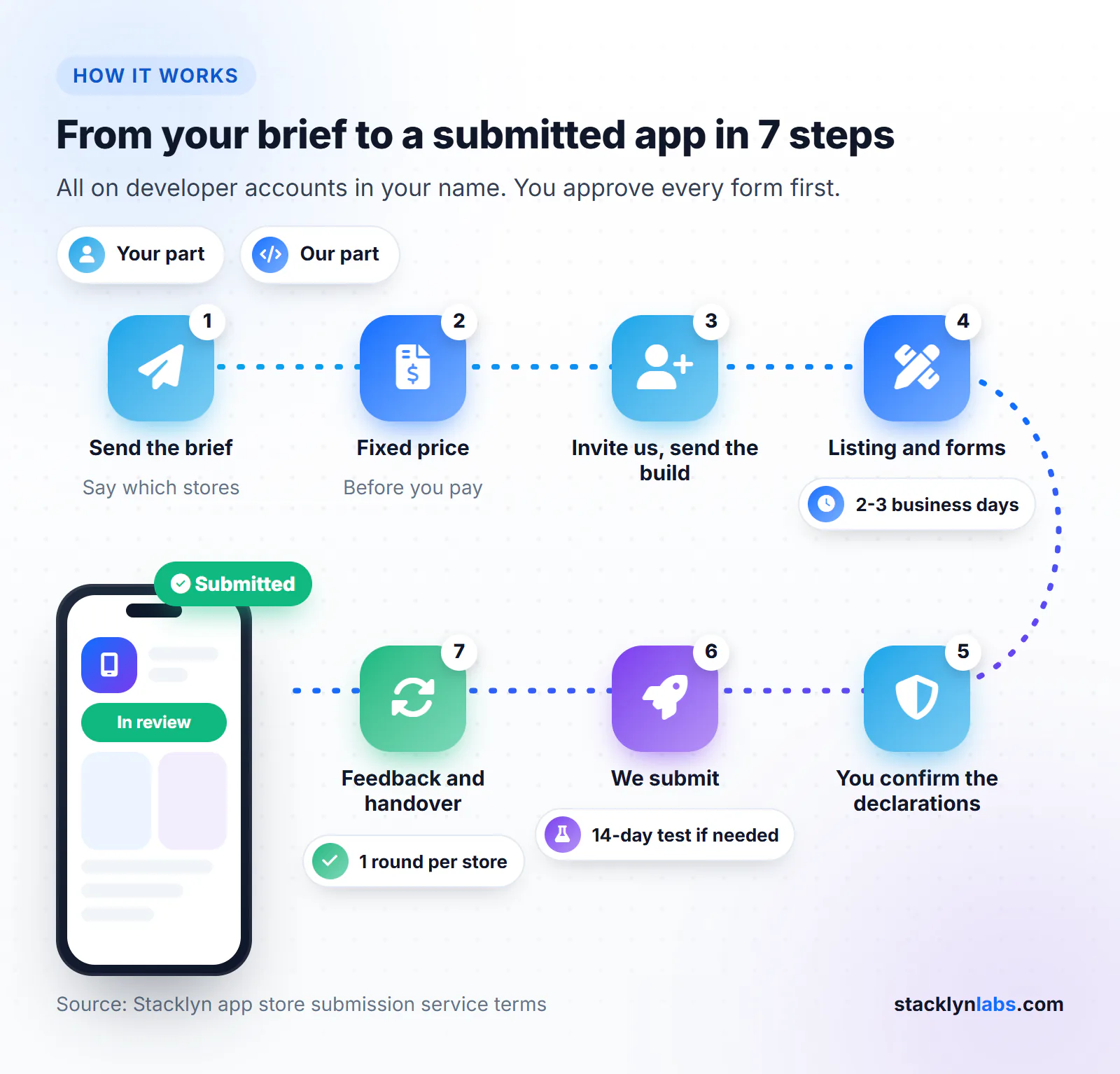
  1. Send the brief through the hire form. Choose App Reskinning as the service, answer yes to “App Store submission needed?”, and say which stores.
  2. We confirm scope and a fixed price. You'll know what's included before you pay anything.
  3. You invite us to your developer accounts and send the build and assets.
  4. We prepare the listing and forms within 2–3 business days and send them to you for approval.
  5. You confirm the declarations. The privacy and compliance answers go out under your name, so you read them first.
  6. We submit. For a new personal Play account, that starts the closed test; we come back for the production access application after 14 days.
  7. We handle one round of review feedback per store if a store sends the app back, then hand over a short note of what we entered where. You remove our access.
Illustrated seven-step path of our Flutter app store submission service, from brief to submitted app
Our listing work takes 2-3 business days; on a new personal Play account, the 14-day closed test starts at submission.

What's not included

  • Building or signing the app. That's the Pro reskin, or you do it yourself before we start.
  • Finding testers for the Google Play closed test. We set it up; the 12 testers are yours to recruit.
  • Designed marketing screenshots with captions or device frames. We size the screenshots; we don't redesign them.
  • Writing your privacy policy. We check the URL and the in-app link; the policy is yours.
  • Paid app store optimisation or ad campaigns.
  • A guarantee of approval. Apple and Google decide, and nobody can honestly promise their answer.
  • Fixing a rejection that needs new features or code changes. We quote that separately before touching anything.
  • Developer account fees. You pay Google and Apple directly.

Doing it yourself, a freelance gig, or us

Many people get their app through both consoles alone. If you have the time, our app store submission checklist for Flutter apps goes through every form on both stores in order. Freelance gig marketplaces also have sellers who do this work, at prices that vary by seller. Here's how the three compare on the things that cause trouble later.

Do it yourselfFreelance gigStacklyn Labs
CostStore fees plus your timeSet by each seller; check the listing$75+ one store, $120+ both, published
Whose developer accountYoursVaries by seller; confirm before payingAlways yours
Forms and declarationsYou work through each oneVaries; ask which forms are includedEvery form itemised above
Play closed testYou set it upVariesSet up and explained; testers yours
If the store rejects itYou read it and resubmitDepends on the seller's termsOne round per store included; rescue quoted
Who answers privacy questionsYouVariesWe draft, you confirm

The account row matters most. Apple's guideline 4.2.6 rejects apps built from a commercialised template unless the provider of the app's content submits them, which is one of the main reasons why template apps get rejected. Whoever you hire, make sure the app goes out from your account.

FAQ

Frequently Asked Questions

The questions founders ask before they hand us a finished build.

No. Apple and Google make that decision, and nobody can honestly promise their answer. What we can do is remove the reasons submissions commonly fail before the app reaches a reviewer: missing privacy forms, a privacy policy that doesn't load, screenshots at the wrong size, no demo login, an unrated app, or a build that targets an old API level or SDK. If the store sends it back anyway, one round of feedback is included.

Two reasons. Apple's guideline 4.2.6 rejects apps created from a commercialized template unless they're submitted by the provider of the app's content, and for a template you bought and branded, that's you. And the account is where the app lives: reviews, installs, payments and the seller name. On Apple, an individual account shows your legal name as the seller and an organization account shows your company's legal name. If someone else publishes it, they control it. We never publish client apps under our account.

Google requires personal accounts created after 13 November 2023 to run a closed test with at least 12 testers opted in continuously for at least 14 days before applying for production access. Then Google reviews the application, which it says usually takes seven days or less. We set up the test, upload the build and explain the rules, but we don't supply testers. Organization accounts don't have this requirement, though they need a D-U-N-S number to register.

No. In Play Console, the account owner invites us by email under Users and permissions, can limit access to one app, and can set an expiry date. In App Store Connect, you invite us under Users and Access and choose the role we tell you we need. You remove us when the work is done. Your accounts, your apps and your listing stay in your name throughout.

Yes. Google requires every app published on Google Play to complete the Data safety form and post a privacy policy, even if it collects nothing. Apple requires App Privacy details for every new app and update. Check what your SDKs do, too. An offline app with an ad SDK still sends data off the device, and both stores count data collected by third-party code you include. We work it out from the build and you confirm the answers.

One rejection or information request from a store on the submission we made. On the Both Stores tier, that's one round per store. We read it, fix whatever sits in the listing, forms, review notes or account settings, reply to the reviewer where the console allows it, and resubmit. If the fix needs a change to the app's code or a new feature, we tell you exactly what and quote it before doing any work. Further rounds after that are quoted the same way.

Yes. The Pro reskin is from $150 and ends with store-ready builds. Add submission to one store for $75+ or both stores for $120+, and we carry on from the builds we made. Mention it in the same brief and we'll quote both together.

Our part is 2-3 business days to prepare the listing and forms, once we have your build, assets and account access. After that the stores set the pace. Apple says it typically reviews at least 50% of submissions in under 24 hours and 90% in under 48. On a new personal Google Play account, the closed test comes first, so production launch is at least 14 days away, plus Google's review of your production access application. Start recruiting testers early.
Ready to Submit

Ready to get your app on the stores?

Send us which stores, whether your build is signed, and whether your developer accounts exist yet. You'll get a fixed price back before any work starts.